
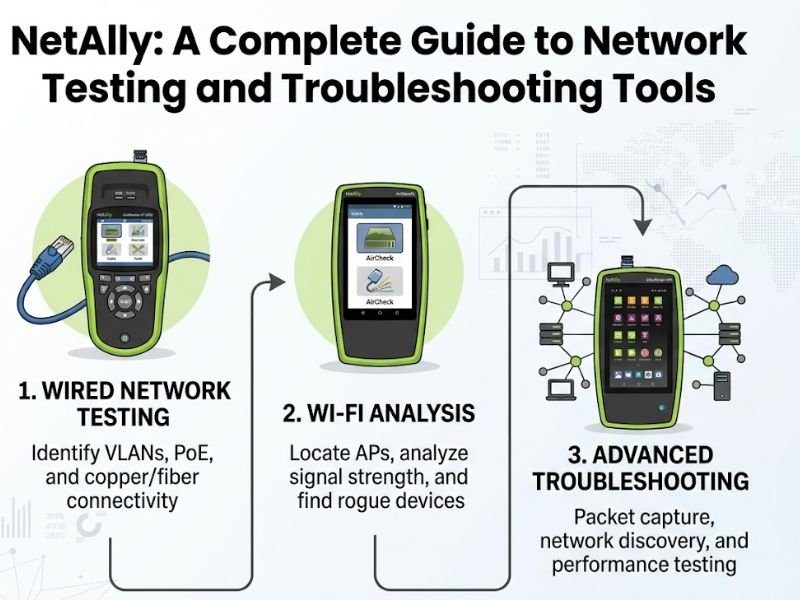

Modern businesses depend on reliable networks for communication, cloud applications, online services, and everyday operations. When a network becomes slow or unstable, finding the cause quickly can be difficult without the right equipment. NetAlly provides a range of network testing and troubleshooting tools designed to help IT professionals, network engineers, and technicians diagnose connectivity problems and understand network performance. From testing Ethernet connections to analyzing Wi-Fi environments, these tools can provide practical information that helps professionals identify issues more efficiently. This guide explores what NetAlly offers, how its tools work, and why network testing is important for modern IT environments.
What Is NetAlly?
NetAlly is a company focused on network test, analysis, and troubleshooting solutions. Its product portfolio includes portable testers and software designed to help IT professionals validate wired and wireless network connections. Instead of relying only on computers or complex network management systems, technicians can use dedicated testing devices to investigate problems directly at the point where they occur. These tools can help identify connectivity issues, verify network configurations, test Power over Ethernet, and gather information about network infrastructure. This makes network testing more practical for technicians working in offices, data centers, industrial environments, and other locations.
NetAlly Tools for Network Testing
One of the key strengths of NetAlly is its range of dedicated network testing products. Different tools are designed for different requirements, from basic Ethernet verification to more advanced wireless and network analysis. Portable testers can provide information about link speed, VLAN configuration, IP addressing, connectivity, and other network conditions. Some devices also support features that allow technicians to discover connected network infrastructure and identify potential configuration problems. Having these capabilities in a portable device can reduce the time needed to diagnose issues because technicians can perform tests directly at the network connection instead of relying on multiple separate tools.
NetAlly and Ethernet Troubleshooting
Ethernet connections remain an important part of business networks, particularly for desktop computers, servers, access points, phones, cameras, and other devices. When an Ethernet connection fails, the cause may involve cabling, configuration, switching equipment, or incorrect network settings. NetAlly testing tools can help technicians examine wired connections and gather useful information about the network. A technician may use a tester to determine whether a link is active, identify the negotiated connection speed, examine network settings, and verify connectivity. These tests can help narrow down potential causes and make troubleshooting more systematic.
Wi-Fi Network Testing with NetAlly
Wireless networks can be more difficult to troubleshoot because performance is affected by factors such as signal strength, interference, channel usage, access point placement, and network configuration. NetAlly provides tools designed to help professionals analyze Wi-Fi environments and identify potential connectivity or performance issues. Technicians can use wireless testing capabilities to examine available networks, signal conditions, access points, and other information relevant to wireless performance. This can be particularly useful when users report weak connections, dropped signals, or inconsistent network speeds. By collecting information from the actual location where a problem occurs, technicians can make more informed troubleshooting decisions.
Power over Ethernet Testing
Power over Ethernet, commonly known as PoE, allows network cables to carry both data and electrical power to compatible devices. It is widely used for equipment such as wireless access points, security cameras, VoIP phones, and certain IoT devices. When a PoE-powered device stops working, technicians need to determine whether the problem is with the device, cable, switch, or available power. NetAlly testing equipment can help technicians verify PoE-related information and identify potential issues with network connections. This can simplify troubleshooting in environments where many powered network devices are deployed.
Network Discovery and Visibility
Understanding what is connected to a network is an important part of troubleshooting. A technician may need to identify switches, routers, access points, endpoints, and other devices before determining where a problem is located. NetAlly tools can help provide visibility into network infrastructure and connected devices. This information can be useful when documenting a network, investigating connectivity problems, or verifying that equipment is connected as expected. Network visibility can also support routine maintenance because technicians can identify unexpected devices or changes in the network environment.
Benefits of Using NetAlly for IT Professionals

Dedicated network testing equipment can provide several practical advantages for IT teams. Portable devices allow technicians to take their testing capabilities directly to the location of a problem. Instead of carrying multiple laptops, adapters, and specialized software tools, a technician may be able to perform several common tests using a dedicated network analyzer. This can help make troubleshooting more consistent and reduce the time spent switching between different tools. The value of a testing platform ultimately depends on the specific network environment and the features required by the IT team.
NetAlly for Network Troubleshooting
Effective troubleshooting usually begins with identifying the symptoms of a problem and collecting reliable information. NetAlly tools can support this process by providing test results that help technicians determine whether an issue is related to connectivity, addressing, cabling, wireless conditions, or network infrastructure. For example, if a user cannot access a network service, a technician can test the connection from the user’s location and gradually investigate each part of the network path. This structured approach can help reduce guesswork and provide evidence for identifying the source of a problem.
Choosing the Right NetAlly Tool
The right tool depends on the type of network and the tasks a technician needs to perform. Businesses focused mainly on wired Ethernet may need different capabilities from organizations managing large Wi-Fi deployments. Before choosing a product, IT teams should consider the network technologies they support, required testing features, portability, reporting capabilities, and the number of technicians who will use the equipment. It is also important to consider whether the tool can support current networking standards and fit into the organization’s existing troubleshooting workflow. Comparing product specifications with actual operational requirements can help ensure that the selected equipment provides useful capabilities without unnecessary features.
The Importance of Professional Network Testing
Reliable network testing is important because small connectivity problems can develop into larger operational disruptions. A faulty cable, incorrect configuration, weak wireless signal, or problematic network device can affect employees, customers, and business applications. Professional testing helps technicians move from assumptions to measurable information. By collecting network data at the location of an issue, IT teams can often identify problems more efficiently and verify that repairs have actually resolved them. Regular testing can also support network maintenance and help organizations understand changes in their infrastructure over time.
Conclusion
NetAlly provides network testing and troubleshooting solutions that can help IT professionals investigate wired, wireless, and network infrastructure issues. Its portable testing approach gives technicians practical tools for checking connectivity, analyzing Wi-Fi conditions, testing PoE, and gaining greater visibility into network environments. Choosing the appropriate tool depends on the technologies an organization uses and the specific problems its IT team needs to solve. With accurate testing and a structured troubleshooting process, network professionals can better understand connectivity issues and maintain more reliable business networks.
FAQs
What is NetAlly used for?
NetAlly is used by IT professionals and network technicians for testing, analyzing, and troubleshooting wired and wireless network connections.
Can NetAlly test Wi-Fi networks?
Yes. Certain NetAlly products provide wireless testing and analysis capabilities that can help technicians investigate Wi-Fi coverage, connectivity, and performance issues.
Can NetAlly test Ethernet connections?
Yes. NetAlly offers tools that can test wired network connections and provide information useful for diagnosing Ethernet connectivity problems.
What is PoE testing?
PoE testing checks aspects of Power over Ethernet connections, which provide both network connectivity and electrical power to compatible devices through Ethernet cables.
Who uses NetAlly tools?
Network engineers, IT administrators, field technicians, installers, and other networking professionals can use dedicated network testing tools for troubleshooting and validation.