
Introduction
Maintaining a clean and well-organized server room is essential for ensuring the reliability, efficiency, and longevity of IT equipment. Server Room Cleaning Frequency: Essential Tips for IT Infrastructure Maintenance is an important consideration for organizations that depend on uninterrupted network operations and secure data processing. Dust, dirt, and airborne contaminants can reduce cooling efficiency, block ventilation, and increase the risk of hardware failures. Establishing the right cleaning schedule, combined with network equipment maintenance, critical infrastructure protection, and proper HVAC maintenance for server rooms, helps businesses minimize downtime, improve equipment performance, and extend the lifespan of valuable IT assets.
Server Room Cleaning Frequency: Essential Tips for IT Infrastructure Maintenance
Determining the correct Server Room Cleaning Frequency is a vital part of every IT maintenance strategy. Unlike regular office spaces, server rooms house sensitive equipment that operates continuously and generates significant heat. Even a small buildup of dust can reduce airflow, clog cooling systems, and negatively affect server performance.
Regular cleaning not only protects hardware but also improves operational efficiency and supports business continuity.
Why Server Room Cleaning Matters
Server rooms are designed to provide a controlled environment for mission-critical IT infrastructure. However, dust, debris, and airborne particles can accumulate over time, leading to several operational issues.
Common problems caused by poor cleanliness include:
- Overheating equipment
- Reduced airflow
- Fan failures
- Increased energy consumption
- Unexpected downtime
- Hardware damage
- Reduced equipment lifespan
Routine cleaning minimizes these risks and helps maintain stable operating conditions.
How Often Should a Server Room Be Cleaned?
The ideal Server Room Cleaning Frequency depends on factors such as room size, equipment density, building location, and environmental conditions.
A typical maintenance schedule includes:
Daily Tasks
- Check temperature and humidity levels
- Remove visible debris
- Monitor airflow
- Inspect for leaks or unusual conditions
Weekly Tasks
- Clean floors using anti-static equipment
- Inspect cable management
- Check air filters
- Verify equipment status indicators
Monthly Tasks
- Clean accessible surfaces
- Inspect server racks
- Remove dust from external equipment
- Review environmental monitoring reports
Quarterly or Semi-Annual Deep Cleaning
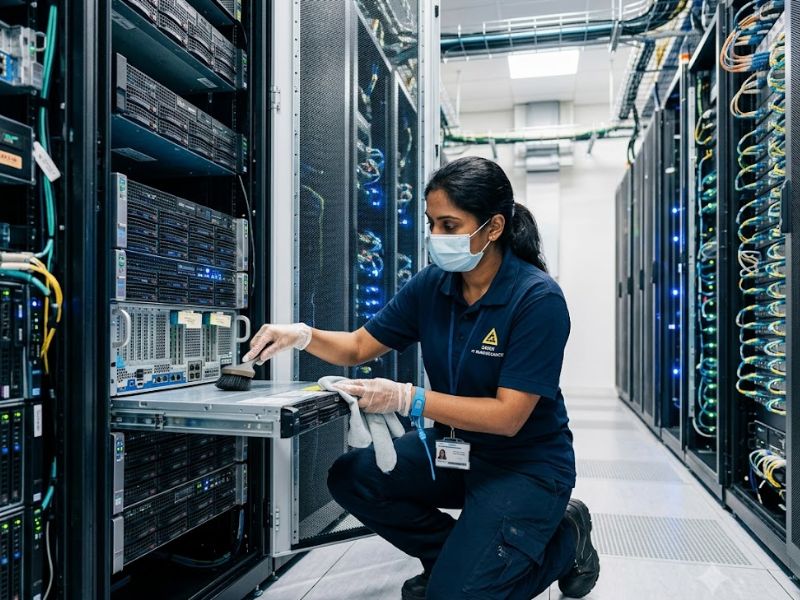
- Professional anti-static cleaning
- Raised floor cleaning
- Ceiling and wall dust removal
- HVAC inspection
- Cooling system maintenance
- Air quality testing
Organizations with high equipment density may require more frequent professional cleaning.
Dust: The Hidden Threat to IT Equipment
Dust is one of the biggest threats inside server rooms.
When dust accumulates:
- Cooling fans work harder
- Airflow decreases
- Components retain heat
- Equipment performance declines
- Failure rates increase
Fine particles can also damage electronic components over time if left unchecked.
Network Equipment Maintenance
Proper network equipment maintenance is essential for ensuring reliable connectivity and uninterrupted operations.
Maintenance activities include:
- Inspecting switches and routers
- Cleaning network cabinets
- Checking cable connections
- Monitoring hardware temperatures
- Replacing worn cooling fans
- Updating firmware
Regular maintenance reduces the likelihood of unexpected failures and extends equipment life.
Critical Infrastructure Protection
Modern organizations rely heavily on digital systems, making critical infrastructure protection a top priority.
Protecting server rooms involves:
- Physical access control
- Environmental monitoring
- Fire suppression systems
- Water leak detection
- Power backup systems
- Security surveillance
- Preventive maintenance
A clean server room supports all these protective measures by reducing avoidable equipment risks.
HVAC Maintenance for Server Rooms
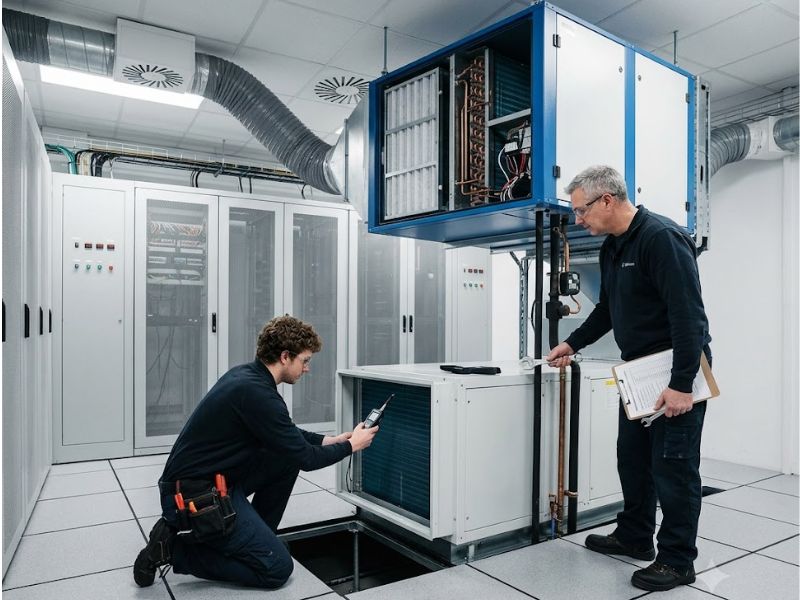
Reliable HVAC maintenance for server rooms is crucial because servers generate significant heat during continuous operation.
Proper HVAC maintenance includes:
- Cleaning air filters
- Inspecting cooling units
- Monitoring airflow
- Maintaining humidity levels
- Servicing ventilation systems
- Checking temperature sensors
A properly functioning cooling system prevents overheating and ensures consistent equipment performance.
Best Practices for Server Room Cleaning
Following industry best practices helps prevent accidental damage during cleaning.
Recommended practices include:
- Use anti-static cleaning tools
- Never use household vacuum cleaners
- Avoid excessive moisture
- Wear appropriate protective equipment
- Follow manufacturer guidelines
- Clean around equipment carefully
- Document maintenance activities
Professional IT cleaning companies often use specialized equipment designed specifically for sensitive electronics.
Common Mistakes to Avoid
Several common mistakes can increase the risk of equipment damage.
Avoid:
- Using regular cleaning chemicals
- Blocking ventilation pathways
- Ignoring air filter replacement
- Allowing food or drinks inside server rooms
- Neglecting cable management
- Skipping environmental monitoring
- Delaying scheduled maintenance
Preventive care is always more cost-effective than emergency repairs.
Benefits of Regular Cleaning
Maintaining the proper Server Room Cleaning Frequency offers numerous advantages.
These include:
- Improved equipment reliability
- Better cooling efficiency
- Lower energy consumption
- Reduced hardware failures
- Longer equipment lifespan
- Improved system uptime
- Better workplace safety
- Reduced maintenance costs
Routine cleaning supports both operational efficiency and long-term IT investment.
Creating a Preventive Maintenance Plan
Every organization should establish a documented maintenance schedule.
An effective plan includes:
- Daily inspections
- Weekly housekeeping
- Monthly equipment reviews
- Quarterly professional cleaning
- HVAC servicing
- Environmental monitoring
- Maintenance records
- Emergency response procedures
A structured maintenance program ensures consistency and accountability.
The Future of Server Room Maintenance
Modern data centers increasingly use smart technologies to improve maintenance.
Emerging innovations include:
- AI-powered environmental monitoring
- Predictive maintenance software
- Smart temperature sensors
- Automated airflow management
- Remote monitoring systems
- Intelligent cooling controls
These technologies help organizations identify problems before they impact business operations.
Conclusion
Server Room Cleaning Frequency: Essential Tips for IT Infrastructure Maintenance highlights the importance of maintaining a clean, controlled environment for mission-critical IT systems. Regular cleaning, effective network equipment maintenance, strong critical infrastructure protection, and reliable HVAC maintenance for server rooms all contribute to better equipment performance, reduced downtime, and longer hardware lifespan. By following a structured maintenance schedule and adopting preventive best practices, organizations can protect their technology investments while ensuring continuous, reliable business operations.
Frequently Asked Questions (FAQs)
Why is server room cleaning important?
Regular server room cleaning removes dust and contaminants that can restrict airflow, cause overheating, reduce equipment performance, and increase the risk of hardware failure.
How often should a server room be cleaned?
Basic inspections should be performed daily, routine cleaning weekly or monthly, and professional deep cleaning every three to six months, depending on environmental conditions and equipment density.
What is network equipment maintenance?
Network equipment maintenance involves inspecting, cleaning, updating, and monitoring networking devices such as switches, routers, and firewalls to ensure reliable performance.
Why is HVAC maintenance important for server rooms?
Proper HVAC maintenance for server rooms ensures stable temperatures, adequate airflow, and humidity control, helping prevent overheating and extending equipment life.
How does regular cleaning support critical infrastructure protection?
Maintaining a clean server room reduces operational risks, improves equipment reliability, supports cooling efficiency, and strengthens overall critical infrastructure protection by minimizing preventable failures.